


Description
A simple and efficient addon that shows you the exact coordinates where you died, helping you find your items quickly!
FUNCTIONALITY ⚙️
When you activate the add-on in your world you will obtain the following item:: "Simple Death Coords Menu"
This item allows you to:
Access all addon configurations.
Choose between chat message or action bar display modes.
Configure server mode settings.
Manage operator permissions for multiplayer servers.
How it works:
When you die, the addon will display your death coordinates based on your selected mode:
Chat Mode (In Chat):
You'll receive a one-time message in chat with your exact death coordinates.
Example: "You died at: X: 123, Y: 64, Z: -456".
The message stays in your chat history for easy reference.

Action Bar Mode (In Actionbar):
Your death coordinates appear persistently in the action bar (above your hotbar).
The coordinates stay visible as you navigate back to your death point.
Smart distance tracking: Automatically clears when you get within 8 blocks of your death location.
If you die again before reaching your previous death point, it updates to show your newest death location.

FEATURES ✨
💀 Death coordinates display - See exactly where you died.
💬 Chat mode - Simple one-time message showing your death coordinates.
📍 Action bar mode - Persistent display that guides you back to your death point.
📏 Smart distance tracking - Automatically disappears when you're close (8 blocks).
🔄 Multiple deaths support - Always shows your most recent death location.
🎮 Server mode - Permission system for administrators in multiplayer.
👥 Operator management - Grant and revoke operator permissions.
🎨 Intuitive interface - Easy-to-use form menus.
⚡ Lag-free - Optimized to not affect game performance.
🌍 Multi-dimension support - Works in Overworld, Nether, and The End.
HOW TO GET THE ITEM 🎁
If you lost the items, you can craft them!
Configs Menu Recipe:
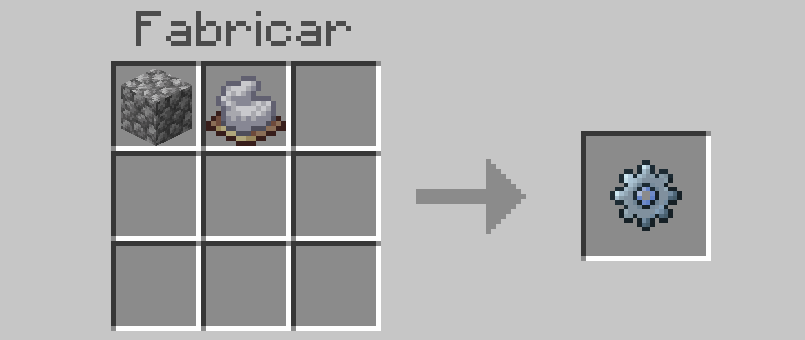
Materials needed:
1x Cobblestone
1x Light Gray Dye
Or use commands:
/give @s dl_sdcoords:addon_menuYou can also create it from the inventory in creative mode!
(Found in the "Equipment" category)
COMPATIBILITY ✅
This addon is completely compatible with other addons and does NOT use experimental features!
✅ Compatible with achievements.
✅ No experimental features required and no player.json.
✅ Works in survival and creative modes.
✅ Multiplayer compatible (server mode included).
✅ Compatible with other add-ons.
ALL MY LINKS 💙
Join my Discord community, subscribe to my YouTube channel, and Buy me a coffee to continue supporting my projects! 🫶🏼
DISCORD COMMUNITY: https://discord.com/invite/PPT2uQSvpY
YOUTUBE CHANNEL: https://www.youtube.com/@DARKLEXx_mc
BUY ME A COFFEE: https://buymeacoffee.com/darklexx
You won't regret it!!!
INSTALLATION PROCESS & SUPPORT 💡🆘
Correct installation process:
Download both files, the behavior pack [BP] and the resource pack [RP] (If you only download one of the two .mcpack files, the add-on may not work properly).
Import both files into Minecraft Bedrock. One at a time.
Activate the add-on in an old or new world. When you activate one of the two, the other will automatically activate. For example: if you activate [RP] -> [BP] will automatically activate.
Enjoy :)
If you encounter any issues or have questions:
Join the Discord server for quick support.
Report bugs in the section intended with detailed information.
Share your suggestions for future updates.
Comments