


Description
LiftBlocks — Elevator Addon
Created by BLUCKS450
What is LiftBlocks?
LiftBlocks is the most complete elevator addon for Minecraft Bedrock. Whether you want a simple one-click teleport elevator for your survival base, a hidden secret elevator disguised as a bookshelf, or a fully physical platform that moves block by block in real time — LiftBlocks has it all.
No redstone. No commands. Just elevators that work.
✅ Key Features
8 elevator types including 4 hidden camouflaged variants
Physical Platform Elevator — moves block by block in real time
Group Elevator — transports all players simultaneously
Ownership Wrench with full in-game UI — no chat commands needed
Public / Owner Only / Team permission system
Unique particles, sounds and effects per elevator type
On-screen floor indicator when traveling
Balanced crafting recipes for survival mode
Full multiplayer support
⚡ Teleport Elevators
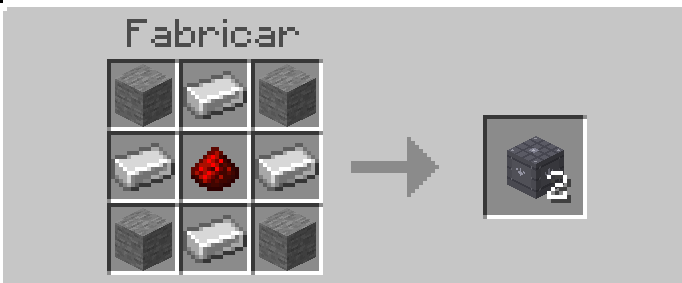
⚙️ Basic Elevator
The starter elevator. Easy to craft and perfect for small bases.
Range: 64 blocks
Recipe: Stone + Iron Ingot + Redstone
🔩 Industrial Elevator
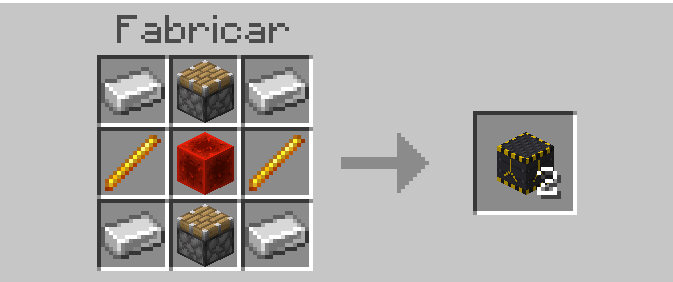
Faster and with greater range. Requires Nether materials.
Range: 100 blocks
Recipe: Iron + Piston + Blaze Rod + Redstone Block
🟣 Ender Elevator
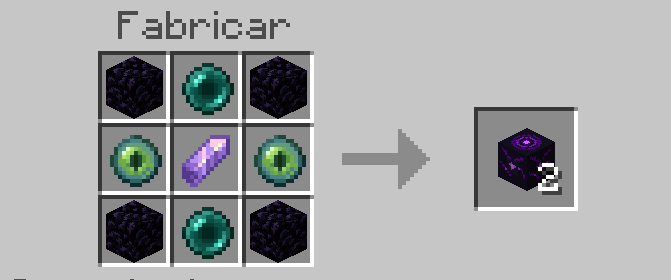
The most powerful elevator in the addon. Instant teleport with End-style effects.
Range: 128 blocks
Recipe: Obsidian + Ender Pearl + Eye of Ender + Amethyst Shard
💎 Luxury Elevator
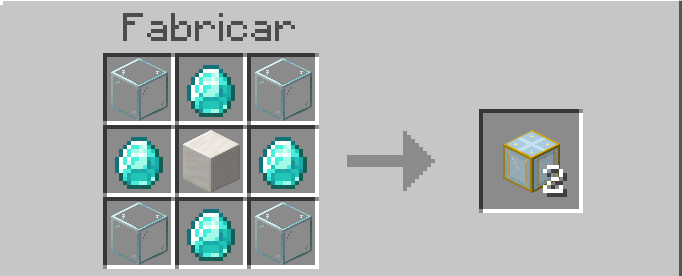
Translucent design with a built-in glow. Perfect for mansions and luxury builds.
Range: 80 blocks
Recipe: Glass + Diamond + Quartz Block
🔗 Decorative Cable
A thin block to fill the space between floors visually.
Recipe: 3× Chain in a column → 6 cables
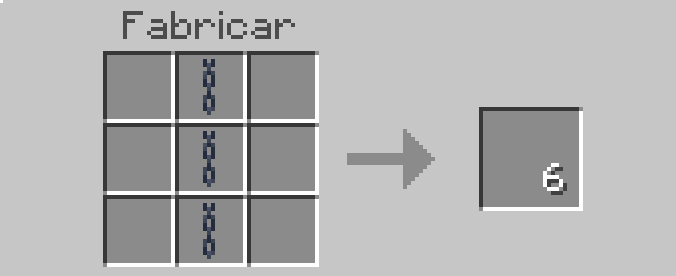
Recipe: Glass + Diamond + Quartz Block
🕵️ Hidden Elevators
These look exactly like normal Minecraft blocks. Perfect for secret bases, adventure maps, and traps. Nobody will know they're elevators.
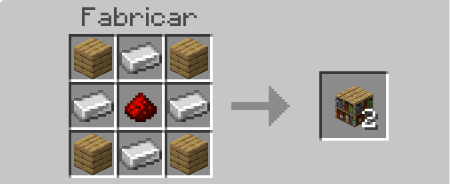
📚 Bookshelf Elevator
Looks exactly like a vanilla bookshelf.
Range: 64 blocks
Recipe: Bookshelf + Redstone + Iron Ingot
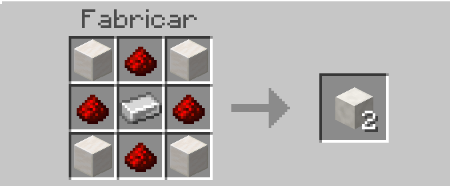
🪨 Quartz Elevator
Looks exactly like a quartz block.
Range: 80 blocks
Recipe: Quartz Block + Redstone + Iron Ingot
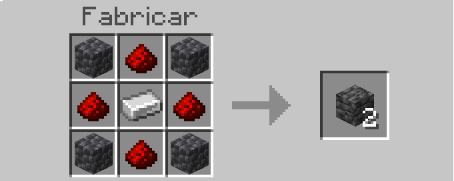
🌑 Deepslate Elevator
Looks exactly like cobbled deepslate.
Range: 100 blocks
Recipe: Cobbled Deepslate + Redstone + Iron Ingot
🪵 Wood Elevator
Looks exactly like an oak log.
Range: 64 blocks
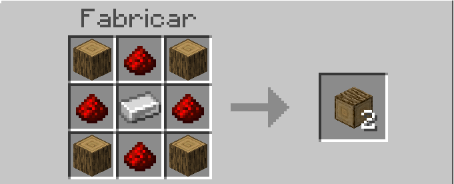
Recipe: Oak Log + Redstone + Iron Ingot
👥 Group Elevator
The ultimate multiplayer elevator. When any player on top jumps or sneaks, every player standing on the block travels together at the same time.
Range: 128 blocks
Shows on screen: ✦ 3 players transported → Floor ~5
Cooldown applies to the entire group
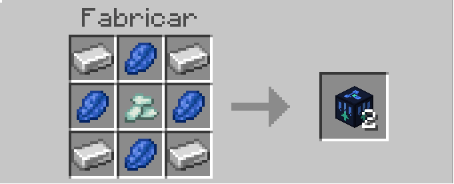
Recipe: Iron Ingot + Lapis Lazuli + Prismarine Crystal
🏗️ Physical Platform Elevator
The most realistic elevator in the addon. A platform block that physically moves block by block up and down a shaft in real time. Players standing on it ride along automatically.
How to set it up:
Dig a vertical shaft
Place the Platform block inside the shaft at the starting floor
Place Control blocks on the wall beside the shaft, one per floor — always one block above where the platform should stop
Right-click any Control block to operate the elevator
How it works:
If the platform is not at your floor → right-click calls it to you
If the platform is at your floor → right-click sends it up to the next floor · Sneak + right-click sends it down
Features:
Mechanical sound during movement
Ding sound on arrival
Smoke particles during travel
Movement blocked if path is obstructed
Cannot be activated while already moving
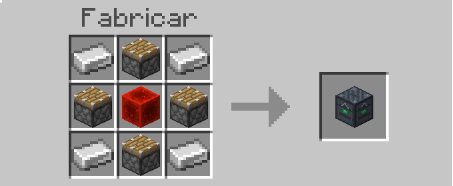
Platform Recipe: Iron Ingot + Piston + Redstone Block (center) → 1 platform
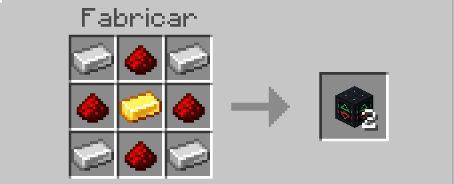
Control Block Recipe: Iron Ingot + Redstone + Gold Ingot (center) → 2 controls
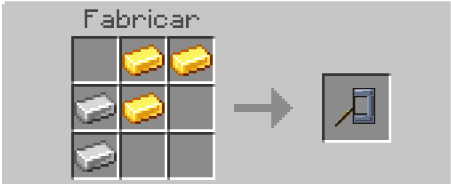
🔧 Ownership Wrench
Craft the Ownership Wrench and right-click any elevator to manage it — no commands needed, everything is done through in-game menus.
Recipe: Gold Ingot + Iron Ingot (diagonal shape)
ActionResultRight-click unowned elevatorClaim ownershipRight-click your elevatorOpen permission panelRight-click someone else'sView owner and your access status
Permission modes:
🌐 Public — everyone can use
🔑 Owner Only — only you
👥 Team — you + selected players
You can add or remove players from your team directly from the in-game menu. When an unauthorized player tries to use your elevator they see ⛔ Access Denied with a sound.
🎮 How to Use
Craft any elevator type at a crafting table
Place 2 or more blocks of the same type in the same column (same X and Z, different Y)
Stand on top of the block
Jump → travel up to the next floor
Sneak → travel down to the floor below
Elevators only connect with blocks of the same type. A Basic Elevator will not connect to an Industrial Elevator.
⚙️ Installation
Download the .mcaddon file
Open it — it installs automatically in Minecraft
Enable the addon in your world (Behavior Pack + Resource Pack)
Under World Settings → Experiments enable:
✅ Beta APIs
✅ Holiday Creator Features
The addon will not work without these options enabled.
📋 Requirements
Minecraft Bedrock Edition 1.21.0 or higher
Experiments: Beta APIs and Holiday Creator Features must be active
LiftBlocks v2.3 — Created by BLUCKS450
Comments