


Description
BedrockWorldBorder
Java got world borders. Bedrock didn't. So we fixed that.
Ever wanted to stop your players from wandering off into the infinite void of chunks you'll never use? Maybe you're running a survival server and someone's decided to walk 50,000 blocks in one direction "just to see what's out there." Or maybe your Realm is getting a bit too spread out and the lag is starting to show. Either way, you need a wall — a big, beautiful, impossible-to-miss wall.
BedrockWorldBorder gives you exactly that. Proper Java Edition-style world borders, complete with towering animated particle walls that stretch 320 blocks into the sky. They look fantastic, they work on every dimension, and your players will absolutely know when they've reached the edge of civilisation.
What Can You Do With It?
Set up independent borders for the Overworld, Nether, and End — each with their own size, centre point, and style. Choose from 11 different animated particle styles, pick your border colour, dial the opacity up or down, and make each dimension look exactly how you want it.
When a player hits the border, you've got options. Teleport them smoothly back inside (without that annoying camera snap — you're welcome), or give them a physics-based knockback that sends them bouncing off the wall. Both feel great. Knockback is particularly fun for minigame arenas.
You can also lock down the outside entirely. Turn on interaction prevention and players can't break, place, or interact with anything beyond the border. No sneaky chest raiding in the wilderness. Admins and bypassed players are exempt, obviously — we're not monsters.
Setting It Up
1. Download both packs (behaviour and resource)
2. Add them to your world
3. Run `/worldborder:menu`
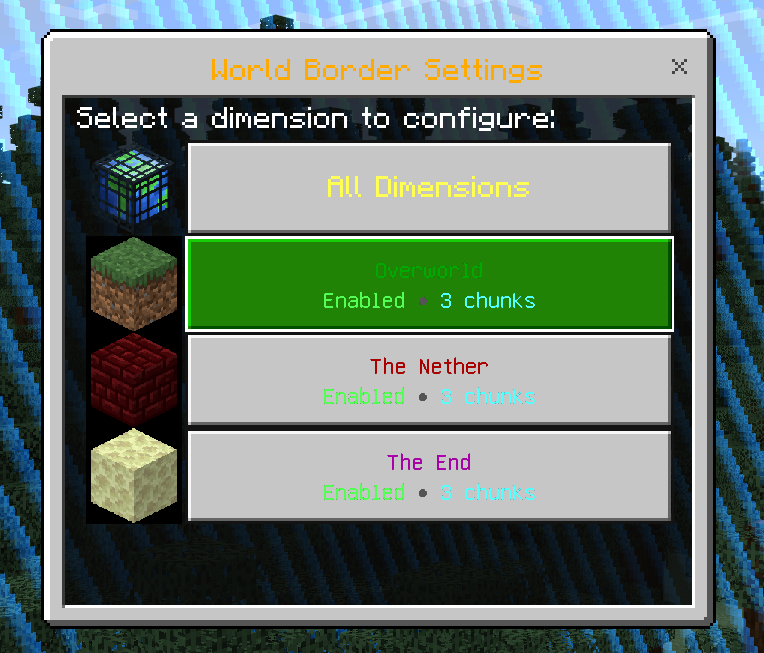
4. Pick your dimension, set your size, choose a style, and you're done
Everything's configured through a clean in-game GUI. No config files to edit, no JSON to mess with. Just a nice menu with dropdowns, sliders, and toggles.
Commands
| Command | What it does |
|---|---|
| `/worldborder:menu` | Opens the settings GUI (the easy way) |
| `/worldborder:status` | Shows current border settings for all dimensions |
| `/worldborder:size
| `/worldborder:center
| `/worldborder:allow
Good to Know
- No beta APIs. This runs entirely on stable Minecraft APIs, so it won't break every other update.
- Per-dimension everything. Different sizes, styles, colours, centres, and enforcement actions for each dimension. Go wild.
- Multiplayer friendly. Admins get "beyond border" warnings instead of being teleported. Players with the `border_bypass` tag can cross freely.
- It remembers your settings. Everything persists between world loads. Set it and forget it.
- Warnings before enforcement. Players get distance warnings as they approach, so nobody gets teleported without fair notice.
Requirements
- Minecraft Bedrock Edition 1.21.130+
Credits
Made by Rob 'myGen' Hall - myGen.co.uk
Licensed under CC BY-NC-SA 4.0
Comments